IT Leadership · Security · Operating Model
IT Without a Perimeter: An Operating Model for the Small to Medium-Sized Company
Executive summary
A small to medium-sized company no longer has a network perimeter to defend, and its IT function should be organised around identity instead. Its people work from homes, offices, labs and manufacturing facilities. Its tools are a collaboration suite and well over a hundred other cloud applications.
This paper describes an operating model for that company, taken here as roughly 100 to 1,000 employees. It is written for IT leaders and for the executives who fund and rely on them.
- The pressure is measurable. Mid-market companies averaged 164 SaaS applications in 2026, and only 56% of applications in use had IT approval. Third parties were involved in nearly half of breaches, and unpatched vulnerabilities became the most common way in.
- The model has one decision point. Every request for access, from a person, a partner or an AI agent, passes an identity platform that checks role and device health. Network location plays no part.
- The team is small and built for automation. At a current median of about 75 employees per IT team member, the function runs from one or two people at 100 employees to about 13 at 1,000.
- Business systems have two owners. A business function owns each process and its results. IT owns the system, its integrations and its changes.
- Software companies split the work. Engineering runs production. IT secures the identities, laptops and tools that lead to it.
- Labs and plants need a different stance. Production networks stay separated from corporate networks by a controlled middle zone, with shared ownership between IT and operations.
- Audits are designed in. Controls that leave evidence from the first day make SOC 2, ISO 27001 and similar audits far less disruptive. They do not replace controls that work.
- Progress comes in four stages. Foundation, automation, assurance and leverage, each closed by a test that someone outside IT can verify.
Why the old model no longer fits
The traditional IT model assumed a trusted office network, a short list of approved software and human users only. All three assumptions have failed, and the 2026 data shows how far.
Work left the building. Staff connect from homes, offices, labs and plants to services the company does not host. There is no single network to put a firewall around, and IT often never meets the people it grants access to.
Software multiplied. Mid-market organisations averaged 164 SaaS applications in 2026, up from 116 a year earlier. Only 56% of applications in use carry IT approval, and 18% of organisations had a breach caused by a former user who still had access (BetterCloud, 2026 State of SaaS).
Attackers adapted. Verizon’s 2026 Data Breach Investigations Report covers more than 22,000 confirmed breaches from November 2024 to October 2025. Exploiting unpatched software is now the most common way in, at 31% of breaches against 13% for credential abuse, the previous leader. Defenders also patched more slowly than the year before.
| Indicator in the Verizon report | 2025 edition | 2026 edition |
|---|---|---|
| Initial access through vulnerability exploitation | 20% | 31% |
| Breaches involving a third party | 30% | 48% |
| Breaches involving ransomware | 44% | 48% |
| Known-exploited vulnerabilities fully remediated | 38% | 26% |
| Median days to fully patch | 32 | 43 |
All figures in the table are from Verizon’s 2026 Data Breach Investigations Report. Verizon counts organisations with fewer than 1,000 employees as small and medium-sized. Where the victim’s size was known, about 96% of ransomware victims were in that group.
Slower patching has a visible cause. In a study of more than 13,000 organisations, the median organisation had 16 known-exploited vulnerabilities to patch, up from 11. The data also ends before the 2026 growth in AI-assisted vulnerability research that Verizon flags.
Credentials remain central all the same. Credential abuse appears at some stage of 39% of breaches, more than any other technique.
Social engineering moved as well. Click rates on voice and text phishing simulations ran 40% higher than on email, and attackers impersonate help desk agents or users who need a password reset. Such pretexting is a growing way into ransomware and extortion attacks. That makes the service desk’s reset procedure a primary control.
AI added users that are not people. 84% of organisations are piloting or deploying agentic AI, and AI-powered tools already make up about 22% of the average SaaS portfolio. Verizon counts 45% of employees as regular AI users on corporate devices, up from 15%. Shadow AI detections rose fourfold in its data-loss dataset, and source code was the data most often submitted.
A network perimeter answers none of this. What the four shifts have in common is a question of identity: who or what is asking, from which device, for which application.
Eight principles
A modern IT function in a small to medium-sized company is a small product team whose product is the company’s ability to work securely from anywhere. Eight principles follow from that definition.
- Identity is the control plane. Every person, device, application and AI agent has a managed identity. Access follows identity and device health, not network location.
- The employee lifecycle is automated. The HR system is the source of truth. Joining, changing role and leaving trigger access changes automatically. Nobody opens or processes a ticket, and the workflow keeps its own record.
- Every endpoint is managed, wherever it sits. Laptops ship directly to people, enrol themselves and stay compliant without ever touching a corporate network.
- IT buys platforms and owns integration and governance. The scarce skill is choosing, connecting and governing cloud services, not operating infrastructure.
- Security is part of operations. Below roughly 500 people, IT and security usually work as one team with one backlog, backed by an outside detection and response service. Companies that are prominent targets or do very sensitive work, such as defence, government, utilities or healthcare, often need a separate security lead much earlier.
- Offices are thin; plants and labs are not. An office is a managed internet connection. A factory or lab needs segmented networks, local resilience and its own change discipline.
- AI is both a workload to govern and a tool to run IT with. In a software company the developers will often be the most advanced AI users. IT still needs enough hands-on skill to set credible guardrails and to automate its own work.
- IT is measured like a business service. The measures are time to productivity, employee experience, cost per employee and risk reduced, not tickets closed.
Reference architecture
Every access request passes one decision point: the identity platform, informed by HR data and device health. Network location plays no part in the decision.
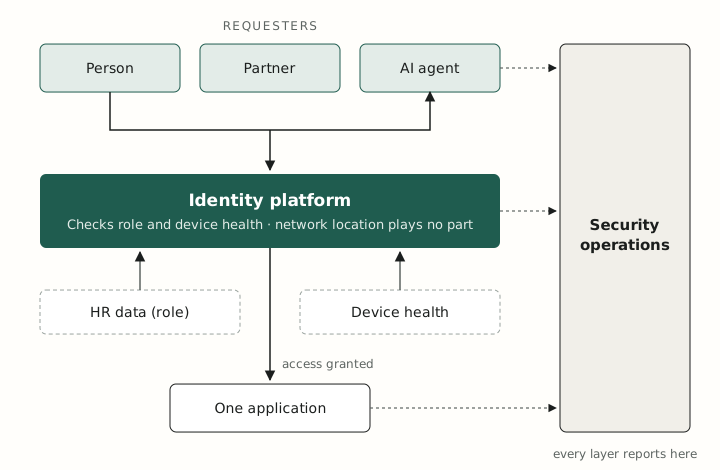
Figure 1 reads top down. A person, partner or agent asks for access; the identity platform checks role and device health; access is granted to one application, and every layer reports to security operations.
Eleven capability domains
The function owns eleven domains, and each needs a named owner even when one person holds several. The third column is the standard to aim for.
| Domain | What IT owns | What good looks like |
|---|---|---|
| Identity and access | Identity provider, single sign-on, MFA, lifecycle, privileged and non-human accounts | One identity provider in front of every app that supports it. Phishing-resistant MFA for everyone. Accounts created and removed from HR data. Leavers lose all access the same day. |
| Endpoints | Laptops, phones, device management, patching, endpoint detection, encryption | Devices ship direct and enrol themselves. All are managed and encrypted. Patch deadlines are enforced. Device health feeds the access decision. |
| Collaboration suite | The Google Workspace or Microsoft 365 tenant | External sharing restricted by default. Third-party app grants reviewed. Retention and legal hold configured. Few administrators, with emergency accounts tested. |
| SaaS portfolio | Discovery, intake, licences, renewals, offboarding per app | A complete inventory with owner, cost and renewal date. Requests for new tools answered within a week. Unused licences reclaimed automatically. |
| Business systems and integration | ERP, CRM, finance and HR platforms as systems: integrations, data flows, change control, vendor relationship | Every business application has a named business owner and an IT counterpart. One system of record per kind of data. Integrations documented and monitored. Changes ranked with business leaders on a regular cadence. |
| AI tools and agents | Approved tools, data rules, agent identities and permissions | A published list of approved tools and the data each may see. Contracts that bar training on company data. Agents with their own scoped identities and logs. |
| Network and sites | Wi-Fi, internet links, secure remote access, meeting rooms, badge systems | Offices are internet-only, with no trusted internal network. Remote access is granted per application, not per network. Meeting rooms work on the first try. |
| Security operations | Detection, response, vulnerability and email security, awareness | Round-the-clock monitoring by an outside service. Identity, suite and endpoint logs in one place. A rehearsed incident plan. Exploited vulnerabilities patched in days. |
| Data protection and continuity | Classification, loss prevention, backup, recovery | Independent backup of the suite and key applications, with any gap recorded and dated. Restores tested on a schedule. Recovery targets agreed with the business. |
| Compliance and vendor risk | Certifications, policies, vendor reviews, cyber insurance | Evidence collected automatically. Vendors tiered by the data they touch. Insurer and customer requirements met without a scramble. |
| Service desk and employee experience | Support, onboarding, knowledge base, hardware logistics | New hires productive on day one. Common requests self-served or automated. Satisfaction measured and published. |
Two of these standards are often blocked by the vendor rather than by effort: single sign-on and independent backup. Many vendors reserve sign-on integration and export interfaces for higher-priced plans, and some offer no backup route at all. Deferring either is acceptable when it is deliberate.
- Record the gap in the application inventory with an owner and a target date.
- Apply a stopgap. For sign-on: a password manager, enforced MFA and a manual offboarding step. For backup: scheduled exports.
- Close it at the next renewal, and make sign-on and export rights buying criteria for new tools.
The aim does not change. Each gap is technical debt to retire as early as cost and contract allow.
Business systems: two owners for every application
The systems that run the business, such as ERP, CRM, finance and HR platforms, need two owners. A business function is accountable for the process and its results. IT is accountable for the system, its data flows and its changes.
IT should not claim the outcomes. Finance owns the close and sales owns the pipeline, but neither works if the system is unreliable, disconnected or changed without control.
| Area | The business function owns | IT owns |
|---|---|---|
| Process and results | The process design, its results and the quality of its data | A system that is available, secure and fit for the process |
| Change | What changes and in what order | Change control, testing, release and documentation |
| Integration and data flows | Which system is the record for each kind of data | Building, documenting and monitoring the integrations |
| Master data | A named owner for customer, employee, product and supplier data | One system of record per kind of data, enforced in the integrations |
| Vendor and contract | The business case and the budget | Selection process, security review, contract and renewal |
| Adoption and improvement | Training, usage and process change | Usage data, automation and retiring duplicate tools |
Four rules make shared ownership work:
- Every business application has one named business owner and one IT counterpart.
- Business leaders rank change requests together in a regular forum. IT should not have to choose between finance and sales.
- A function that runs its own administrators, such as sales operations, follows the same change, access and integration rules.
- Integrations are treated as products. Each has an owner, documentation and monitoring.
By about 300 people this work usually justifies a dedicated business systems role, in IT or in the function with the largest system.
Beyond the office: engineering, labs and plants
An office can be run as a managed internet connection, but a lab or plant cannot. Production equipment puts safety and uptime ahead of confidentiality, often cannot be patched and is frequently maintained by its vendor.
| Site type | What makes it different | IT’s stance |
|---|---|---|
| Office | Wi-Fi, meeting rooms, printing, badges, visitors | No implicit trust on the office network. Cloud-managed network equipment. One standard room kit, monitored remotely. |
| Engineering and R&D | Build servers, test rigs, Linux workstations, GPUs, high-value intellectual property, privileged users | The same identity and endpoint baseline as everyone, with documented exceptions. Separate lab networks. Source code and design data treated as the top data class. |
| Research labs | Instruments tied to old operating systems, vendor-supplied PCs, large data volumes | Instruments isolated on their own network. Data moved automatically from instrument to managed storage. Vendor access brokered, never direct. |
| Manufacturing | Controllers, supervisory systems, equipment that stays in service for decades | Production network separated from corporate by a controlled middle zone. Change windows set by production. Joint ownership with operations. |
Six rules hold the boundary between corporate IT and production technology:
- No direct route exists between the corporate network and the production network. Everything crosses the middle zone.
- The production network has no internet access, or access limited to the named destinations its equipment needs, routed through the middle zone.
- Vendor remote access is brokered, time-limited and recorded.
- Production equipment has its own asset inventory, with a patch or compensating-control plan for each asset.
- The plant is designed to keep running when the internet, the identity provider or the collaboration suite is down. Where a cloud dependency cannot be removed, it is documented with a manual fallback and accepted by operations.
- Each site has one named owner in IT and one in operations.
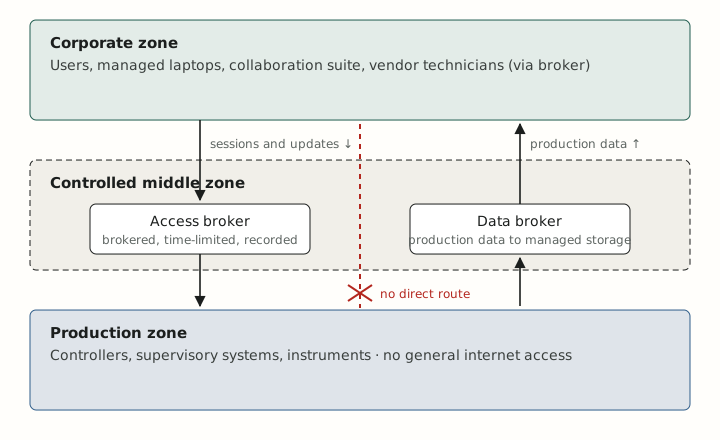
In Figure 2, sessions and updates travel down and production data travels up, each through a broker in the middle zone. Nothing crosses directly between the top and bottom zones.
IEC 62443 and NIST SP 800-82 are the reference standards for this zoning model.
When the company builds software or cloud services
When the product is software, engineering or DevOps runs production, and IT secures everything that leads to it. The people who can reach production do so with a corporate identity, from a company laptop, through development tools. All three are IT’s ground.
IT does not run production. It sets the conditions under which people reach it, and it supplies the workforce half of every customer audit.
| Area | Engineering or DevOps owns | IT owns |
|---|---|---|
| Production cloud accounts | Architecture, configuration, runtime security, on-call | Federated sign-on for staff, so one HR-driven identity grants and removes access |
| Source code and build pipeline | Repositories, branch rules, secrets, pipeline security | Sign-on, MFA and offboarding for the code host; device health as a condition of access |
| Developer workstations | Tool choice and local environments | Managed baseline, encryption, endpoint detection and patching, with documented developer exceptions |
| Engineering tools, including AI coding assistants | Day-to-day administration and working practices | Inventory, contracts, licences, sign-on, access reviews, vendor risk, data rules |
| Detection and incident response | Production logs and product incident response | Corporate logs, one shared detection service, a joint incident plan |
| Customer assurance | Evidence for product and production controls | Evidence for workforce controls: onboarding, offboarding, devices, training, vendors |
Four rules keep the split workable:
- One workforce identity reaches everything, production included. Cloud consoles and code hosts have no separate, unmanaged accounts.
- Corporate systems and production stay apart. Office networks and IT tools have no standing route into production.
- The split of duties is written down and reviewed whenever either team changes its tools.
- In a small company one engineer may hold both roles. The two sets of duties still carry separate names, so they can be handed over later.
Building for certification from the start
Most companies of this kind will face a security audit, usually because a customer, a regulator or an insurer requires one. Building controls and evidence collection into daily operations makes that audit far less disruptive. Readiness still depends on the right scope, controls that work, and proof that they operated over time.
Many of the controls these frameworks test sit in IT’s domains: access, devices, vendors, logging, backup, incident response and training. The frameworks differ in form, and the terms matter when talking to auditors and customers.
| Framework | What it is | Who typically needs it |
|---|---|---|
| SOC 2 | An attestation report from an audit firm. Type 1 tests control design on one date; Type 2 tests operation over 3 to 12 months (Drata). | Software and service companies selling to businesses |
| ISO/IEC 27001 | A certification of the company’s information security management system | Companies with international or enterprise customers |
| HIPAA | A US law, not a certification. HHS does not recognise private HIPAA “certifications” and requires periodic evaluation instead (HHS). | Healthcare organisations and vendors that handle patient data |
| NIST CSF and SP 800-171 | Frameworks rather than certificates. SP 800-171 is assessed under CMMC for US defence suppliers. | Government and defence suppliers; also a common internal benchmark |
| PCI DSS | The payment card industry’s standard, validated every year | Companies that handle card data |
Evidence cannot be backfilled. A SOC 2 Type 2 audit samples access reviews, change tickets and training records from across its observation period. The controls must be running, and leaving records, before that period opens.
Seven habits, adopted early, make any of these audits cheaper:
- Make every access change leave a record. Lifecycle changes driven by HR data are logged by the workflow itself, with no ticket to process. Requests beyond a role’s standard access need a named approver, and that approval is the evidence.
- Prefer tools with single sign-on, audit logs and data export, and make these buying criteria.
- Keep the device, application and vendor inventories from the first day.
- Run access reviews on a calendar, quarterly for critical systems, and keep the output.
- Write short policies early, have staff acknowledge them and keep training records.
- Retain identity, suite and endpoint logs long enough to cover an audit period, typically 12 months.
- Map each control once to every framework that asks for it, and name one compliance owner, even part-time.
IT rarely owns the certification itself. A compliance or security lead usually does, while IT owns most of the evidence. The staged path later in this paper places formal assurance in stage three, but these habits belong in stage one.
Staffing the function
The team grows from one or two generalists to about a dozen specialists, and the hardest transition is the middle one. The headcount row applies Pave’s 2026 median of about 75 employees per IT team member, drawn from 1,856 companies. The other rows are the author’s recommendation.
| About 100 people | About 300 people | About 1,000 people | |
|---|---|---|---|
| IT headcount at the Pave median | 1 to 2 | 4 | 13 |
| Roles | An IT lead who does everything, plus part-time or outsourced support | IT lead, systems and automation engineer, 1 to 2 support staff; a business systems analyst, in IT or in finance or sales operations | Director or VP; service desk; identity and endpoint engineering; security; business systems; a technician at each large site |
| Security | Owned by the IT lead, with a fractional security advisor | First dedicated security hire, or a security-minded systems engineer | Security team of 2 to 3 with its own lead |
| Outsourced | Round-the-clock detection, after-hours support, device logistics, projects | Round-the-clock detection, device logistics, penetration tests, audits | Round-the-clock detection, hardware lifecycle, specialist projects |
| Main risk | One person holds all the knowledge and all the administrator rights | The team stays a help desk and never builds automation | Silos between IT, security and business systems; nobody owns the plant network |
Three cautions apply to the headcount row.
- The range is wide. Older surveys cited by Pave put the average near 1 per 27 employees, and manufacturing often runs at 1 per 200 or leaner. Treat 1 per 75 as a starting point for a cloud-first company.
- Sites add people. Each lab or plant needs hands on site, whatever the ratio says.
- Automation should change the mix before it changes the count. Capacity freed from password resets and access requests is better spent on engineering than returned as savings.
The security row assumes an ordinary risk profile. A company in defence, government, utilities or healthcare, or one that is a prominent target, should expect a security lead with a separate reporting line well before 500 people, even if IT still does the hands-on work.
The profile to hire for has changed with the work. Scripting and API skills, clear writing and vendor management now matter more than server and network administration.
Twelve common blind spots
IT plans built around the collaboration suite, the workforce and the sites tend to miss the same twelve things. Each has a first move that fits in a quarter.
| Blind spot | Why it matters | First move |
|---|---|---|
| Non-human identities | Service accounts, API keys, app grants and AI agents outnumber people and are rarely offboarded. Disabling a login does not revoke the tokens it issued. | Inventory app grants and API keys in the suite and the identity provider. Give each an owner. |
| Incomplete offboarding | 18% of organisations had a breach caused by a former user who still had access, and only 1 in 4 automates offboarding (BetterCloud). | Measure the time from HR termination to the last access removed, including apps outside single sign-on. |
| The service desk as an attack path | Attackers phone the help desk and talk their way into a password or MFA reset. | Write a reset procedure that verifies identity without relying on facts an outsider could learn. |
| Identity proofing for remote hires | One study counted 27 fabricated job-seeker personas that reached onboarding at monitored organisations in a year (Help Net Security). | Agree with HR who verifies identity at hire. Ship devices only to verified addresses. |
| SaaS backup | Retention settings in the suite are not a backup. Recovery from deletion, ransomware or a bad sync is the customer’s job. Some vendors offer no export or backup interface, or reserve it for higher-priced plans. | Add independent backup for the suite and two or three critical applications, and test one restore. Where a vendor makes backup impractical, record the gap as technical debt with an owner, a stopgap such as scheduled exports, and a date to close it. |
| Shadow AI | 18% of organisations found data leaks originating from AI tools (BetterCloud). Verizon found 67% of users reach AI services through non-corporate accounts on corporate devices. Bans fail without an alternative. | Publish approved tools and data rules. Provide a sanctioned option good enough that people choose it. |
| Vendor risk | Third parties were involved in 48% of breaches in the 2026 Verizon data, and in 55% at small and medium-sized organisations. Only 23% of third parties fully fixed MFA gaps on their cloud accounts. | Tier vendors by the data they touch. Require single sign-on and MFA. Know how to cut each one off. |
| Lab and plant asset inventory | Equipment that is not listed cannot be segmented, patched or insured. | Run passive discovery on production networks. Name an owner for each asset class. |
| Dependence on a few cloud platforms | An outage or lockout at the identity provider or the suite stops the whole company. | Document emergency access and an outage communication channel. Test both once a year. |
| Data governance | Nobody can say where sensitive data lives or who outside the company can open it. | Define three or four data classes. Fix external sharing defaults. Set retention with legal and finance. |
| Cost ownership | Licences renew unreviewed and duplicate tools accumulate. | Keep a renewal calendar with a business owner for each application. Review 90 days before each renewal. |
| Knowledge concentration | Runbooks live in one head and administrator rights in one account. | Two administrators per critical system, a shared credential vault and a runbook for the ten most common tasks. |
Three further topics deserve a line in any plan even when they are not active: cyber insurance requirements, acquisitions, and international expansion with its data-residency rules.
A staged path and how to measure it
The work stages in four steps, and each step ends with a test that someone outside IT can check. Skipping ahead rarely holds, because automation built on an incomplete identity foundation automates the gaps.
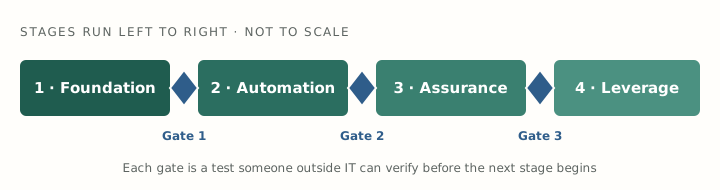
In Figure 3, stages run left to right and are not to scale. A blue diamond marks the gate to pass before starting the next stage.
Eleven measures show whether the model is working. The targets are the author’s suggested starting points and should be tuned to each company’s risk and industry.
| Measure | What it shows | Suggested target |
|---|---|---|
| New hires fully equipped on day one | Lifecycle automation and logistics | 95% or more |
| Time from termination to all access removed | Offboarding completeness | Same day, including apps outside single sign-on |
| Applications behind single sign-on | Identity coverage | Every application that holds company data, or a dated exception with a stopgap in place |
| Accounts using phishing-resistant MFA | Resistance to credential theft | All administrators first, then everyone |
| Devices managed, encrypted and within patch policy | Endpoint hygiene | 100% managed; 95% within policy |
| Median days to patch known-exploited vulnerabilities | Exposure window | Under 14 days, against a 43-day median in the 2026 Verizon data |
| Applications with a named owner and renewal date | SaaS governance | Every paid application |
| Requests resolved by self-service or automation | Service desk leverage | Rising each quarter |
| Employee satisfaction with IT | Experience | Measured per ticket and twice a year |
| Days since the last successful restore test | Recoverability | Under 180 |
| Business applications with a named business owner and IT counterpart | Shared ownership of business systems | Every system of record |
Conclusion
The IT function described here owns one question: who and what may reach which resource, from which device. Companies that organise around that question can add remote staff, new applications, AI agents and new sites without redesigning their security each time.
The model does not require a large team or a large budget. It requires a complete identity foundation, automation built on top of it, and the discipline to prove controls work before moving on.
Three questions show an executive team where it stands today:
- How long after someone leaves do they lose all access, and how do we know?
- Which applications hold company data without single sign-on?
- When did we last restore from a backup?
A company that can answer all three with evidence has passed the first gate. A company that cannot has its starting point.
About the author
Yuri is a Director of IT with more than 20 years of experience across startups, large enterprises, service providers and venture capital firms. His work covers identity and endpoint management, SaaS governance, security and compliance, and the adoption and governance of AI tools.
Sources
Sources were read on 14 and 15 November 2026. Verizon’s figures were checked against the report itself. Roles, capability standards, stages and targets are the author’s recommendations.
- 2026 Data Breach Investigations Report, Verizon, May 2026 (pages 9 to 17, 20, 44, 50, 97 and 98)
- IT Staffing Ratios: How Big Should Your IT Team Be?, Pave, updated 14 August 2026
- The 2026 State of SaaS report, BetterCloud, 15 July 2026 (survey of 525 IT and security professionals)
- Suspected North Korean IT workers reached onboarding at companies with open data, Help Net Security, 13 November 2026
- Are we required to “certify” our organization’s compliance with the standards of the Security Rule?, US Department of Health and Human Services
- SOC 2 Type 1 vs. Type 2: Timeline, Cost, and Key Differences, Drata, 13 March 2026